Why Link Your Facebook Page to Instagram? 10 Benefits
Running a business on social media can quickly become overwhelming, especially when you manage separate Facebook and Instagram accounts. You may find yourself switching between apps to publish content, respond to customer enquiries, monitor engagement and promote your products or services.
For a business owner, this means spending more time managing social media and less time focusing on customers, sales and business growth.
Fortunately, Meta provides tools that allow businesses to connect their Facebook Pages with their Instagram professional accounts and manage important activities across both platforms.
But why link your Facebook Page to Instagram? Is it really necessary, and what benefits does your business gain?
Connecting the two platforms can simplify account management, centralise customer communication, support advertising, make content sharing easier and provide access to useful business insights.
Whether you operate a fashion brand, restaurant, online store, school, real estate company or professional service business in Nigeria, understanding this integration can help you manage your digital presence more effectively.
In this guide, we explain what Facebook and Instagram integration means, its major benefits, how to connect your accounts, common problems and practical ways to use the integration to support your business.
What Does Linking a Facebook Page to an Instagram Account Mean?
Linking your Facebook Page to your Instagram account means establishing a connection between your business presence on Facebook and your professional Instagram profile.
This connection allows you to access certain features that help you manage activities across both platforms.
To understand how it works, let’s look at the two accounts.
What Is a Facebook Business Page?
A Facebook Page is a public presence created on Facebook for a business, organisation, public figure or brand.
Unlike a personal Facebook profile, a Page is designed to help businesses communicate with customers, publish updates, promote products and services, receive enquiries and run advertisements.
For example, a Nigerian clothing business can create a Facebook Page displaying its business name, products, contact information, location and customer reviews.
What Is an Instagram Professional Account?
An Instagram professional account is an account designed for businesses and creators.
Instagram provides two main professional account types:
- Business account: Suitable for companies, shops, service providers, brands and organisations.
- Creator account: Designed primarily for content creators, public figures and influencers.
Professional accounts provide access to features such as professional insights, contact options, advertising tools and other business-related functions.
What Happens When You Connect Both Accounts?
When you link your Instagram professional account to your Facebook Page, Meta can recognise the two accounts as connected business assets.
Depending on your account configuration and permissions, you can use features such as:
- Managing eligible Facebook and Instagram messages through Meta Business Suite.
- Publishing and scheduling content across both platforms.
- Accessing business insights.
- Managing advertising activities.
- Sharing eligible posts and stories across platforms.
- Connecting eligible business and shopping tools.
Important distinction: Accounts Center and Facebook Page linking are not exactly the same thing.
Meta Accounts Center manages connected experiences across Meta accounts, including cross-posting, login experiences and profile-related settings.
Connecting an Instagram professional account directly to a Facebook Page establishes the business relationship needed for certain Page management, advertising and messaging features.
You may need both configurations depending on what you want to accomplish.
10 Benefits of Linking Your Facebook Page to Instagram
Here are ten important reasons businesses should consider connecting their Facebook and Instagram accounts.
1. Manage Facebook and Instagram from One Dashboard
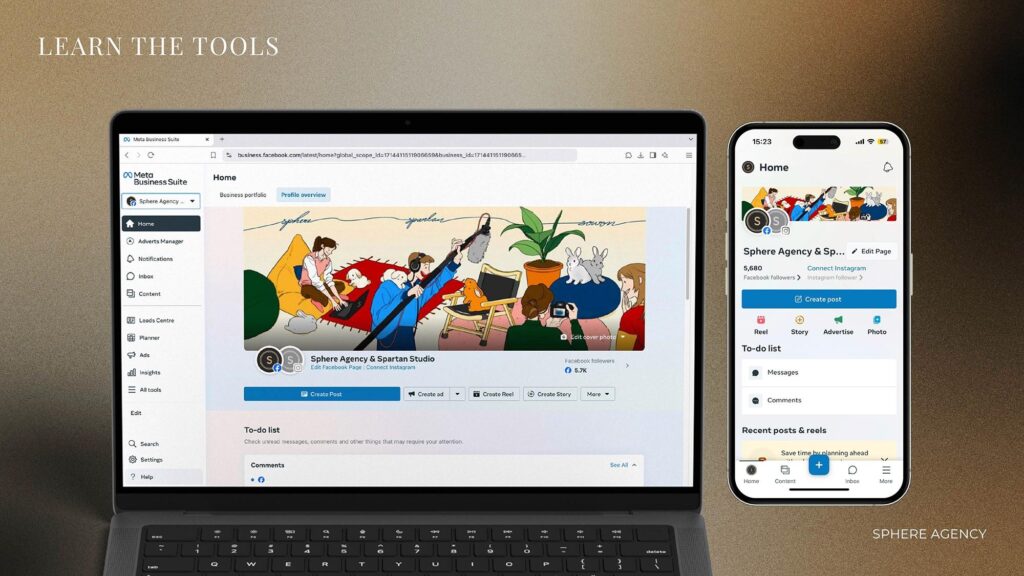
One of the biggest benefits is the ability to manage important activities from Meta Business Suite.
Instead of constantly switching between Facebook and Instagram, you can use a central dashboard to manage supported business activities.
Meta Business Suite provides tools for:
- Creating and publishing content.
- Scheduling posts.
- Managing messages.
- Reviewing comments.
- Monitoring business performance.
- Managing advertising-related activities.
For example, imagine you operate a fashion business in Lagos.
You regularly upload pictures of new clothing collections to Instagram and publish promotional updates on Facebook.
With Meta Business Suite, you can plan and manage eligible content for both platforms from one place.
This can reduce unnecessary work and make your social media management more organised.
2. Respond to Facebook and Instagram Messages in One Place
Customer communication is an important part of running a successful business.
A potential customer might send a Facebook Messenger message asking about your prices, while another person sends an Instagram direct message asking whether a particular product is available.
If you manage both platforms separately, it becomes easier to overlook enquiries.
Connecting your accounts allows you to use the Meta Business Suite Inbox to manage supported conversations from Facebook and Instagram in one location.
Depending on your configuration, you can:
- Read Facebook Messenger conversations.
- View Instagram direct messages.
- Respond to customer enquiries.
- Manage comments.
- Use available inbox automation features.
Practical example:
A customer sends an Instagram message asking for the price of a laptop.
Another customer contacts your Facebook Page asking about delivery to Abuja.
Your sales representative can access both eligible conversations through Meta Business Suite and respond without constantly switching applications.
For Nigerian businesses receiving enquiries through multiple channels, this can make customer communication more manageable.
3. Simplify Facebook and Instagram Advertising
Advertising is another major reason to connect your business accounts.
Meta Ads Manager allows businesses to create and manage advertising campaigns across supported Meta placements, including Facebook and Instagram.
Connecting your Instagram professional account to your Facebook Page helps establish the correct business identity for advertising and makes it easier to manage eligible Instagram advertising activities.
You can use Meta’s advertising tools to:
- Promote products and services.
- Create campaigns for website traffic.
- Generate leads.
- Encourage customer enquiries.
- Promote selected posts.
- Reach audiences across supported placements.
- Review campaign performance.
For example, a real estate company in Lagos can create a campaign promoting available properties and use appropriate Facebook and Instagram placements to reach prospective buyers.
An online store can advertise its products to relevant audiences and direct interested customers to its website or other available contact channels.
However, remember that connecting your accounts does not automatically create successful advertisements.
You still need an effective offer, appropriate audience targeting, good creative content, a realistic budget and a clear conversion strategy.
4. Reach More Potential Customers Through Cross-Platform Marketing
Facebook and Instagram attract different audience behaviours and content consumption habits.
Some customers prefer Facebook because they participate in groups, follow business Pages and interact with community content.
Others spend more time discovering products, watching Reels and following brands on Instagram.
Having a coordinated presence on both platforms gives your business more opportunities to communicate with potential customers.
For example, a restaurant can:
- Share menu updates on Facebook.
- Publish attractive food photography on Instagram.
- Promote special offers across both platforms.
- Use Instagram Reels to showcase food preparation.
- Share customer testimonials and business announcements.
The objective is to make your business accessible to people who prefer different social media platforms.
However, cross-platform presence does not automatically increase your followers or sales. Your content must still be relevant, valuable and engaging.
5. Share Posts and Stories Across Both Platforms
Creating content for multiple social media platforms takes time.
Meta provides cross-posting options that allow eligible content to be shared across Facebook and Instagram.
Through the available sharing settings, you can choose to share supported content across connected profiles.
Depending on the content format and account settings, this may include:
- Feed posts.
- Stories.
- Other eligible content formats.
For example, when launching a new product, you can prepare a promotional post and share it across your connected Facebook and Instagram accounts.
This helps maintain consistent communication without necessarily creating every post twice.
However, do not assume every Instagram feature or content format can be shared identically across Facebook.
Review your content before publishing and adapt captions, hashtags, formats and calls to action to suit each platform.
6. Access Business Insights and Performance Analytics
You cannot improve your social media marketing effectively if you do not understand how your content performs.
Meta Business Suite provides Insights tools that help businesses review performance information for their Facebook Pages and connected Instagram accounts.
Depending on your account and available reporting features, you can review metrics such as:
- Content views.
- Interactions.
- Follows.
- Content performance.
- Advertising results.
- Audience-related information.
For example, an online clothing store can compare the performance of its Facebook posts and Instagram content.
If Instagram Reels generate more interest in a particular product, the business can use that information when planning future content.
Similarly, a training centre can monitor how its course announcements perform across both platforms.
The important thing is to use the available information to make better marketing decisions rather than publishing content without measuring its results.
7. Improve Customer Engagement and Brand Consistency
Customers are more likely to recognise and trust a business when its online identity is consistent.
Connecting Facebook and Instagram makes it easier to coordinate your brand communication across both platforms.
For example, your business can maintain consistent:
- Business names.
- Brand colours.
- Profile photographs.
- Promotional messages.
- Contact information.
- Product descriptions.
- Customer service communication.
Imagine a Nigerian beauty business using different business names and promotional messages on Facebook and Instagram.
Customers may become confused about whether both accounts belong to the same company.
A coordinated social media presence helps reduce this confusion.
It also makes your business appear more organised and professional.
8. Support Eligible Shopping and Product Catalogue Integrations
For businesses selling physical products, Meta offers shopping-related tools and catalogue integrations, subject to eligibility and availability.
A product catalogue is a structured collection of information about the products a business sells.
It may contain:
- Product names.
- Product descriptions.
- Product photographs.
- Prices.
- Product availability.
- Website links.
When correctly configured and approved for eligible features, a catalogue can support product discovery and advertising activities across Meta platforms.
For example, an online electronics store can organise its products into categories such as laptops, accessories, monitors and printers.
This makes it easier to manage product information for supported advertising and shopping experiences.
Important for Nigerian businesses: Do not assume that every Facebook or Instagram Shop checkout feature is available in Nigeria. Meta’s commerce features are subject to country availability, eligibility requirements and policy approval. A business website with a properly configured product catalogue can remain an important sales channel regardless of whether a particular native shopping feature is available.
9. Make Business Account Management More Efficient
As a business grows, social media management often involves more than one person.
You may have a business owner, marketing officer, content creator, customer service representative and advertising specialist.
Meta’s business management tools support assigning appropriate access to people who need to work with business assets.
For example:
- A content creator can prepare social media content.
- A customer service representative can handle eligible messages.
- A marketing officer can manage campaigns.
- A business owner can oversee account access and permissions.
This makes it easier to organise responsibilities.
However, account access should be assigned carefully. Do not share your personal Facebook or Instagram password with employees or external marketers.
Use Meta’s available business access and permission controls instead.
10. Build a Stronger and More Coordinated Online Presence
Your Facebook Page and Instagram account should work together as part of a wider digital marketing strategy.
Connecting them gives you a more coordinated foundation for managing your social media activities.
But there is something else business owners should understand.
Social media should not be the only place where your business exists online.
Facebook and Instagram are valuable marketing channels, but you do not control their platforms, algorithms or account policies.
A professional business website gives your company an additional online destination where potential customers can:
- Learn about your business.
- Explore your products and services.
- Submit enquiries.
- Make purchases.
- Book appointments.
- Find your contact information.
For this reason, a strong digital presence should combine social media, a professional website and search engine visibility.
Why Nigerian Businesses Should Connect Facebook and Instagram
Nigerian businesses increasingly use social media to promote products, communicate with customers and generate enquiries.
Connecting Facebook and Instagram can help different types of businesses coordinate these activities.
Here are practical examples.
Fashion and Clothing Businesses
Fashion retailers can publish new collections, promote available sizes, share customer testimonials and respond to enquiries.
A clothing business in Lagos can use Instagram to showcase its latest designs and Facebook to communicate promotional offers and business updates.
Restaurants and Food Vendors
Restaurants can share menus, food photographs, special offers and customer reviews across their connected accounts.
They can also manage eligible enquiries about delivery, reservations and available menu items through Meta Business Suite.
Real Estate Companies
Real estate businesses can publish property photographs, videos, virtual tours and available listings.
They can also run campaigns designed to generate enquiries from prospective buyers and tenants.
Schools and Training Centres
Educational institutions can promote admissions, courses, training programmes, events and registration deadlines.
For example, a computer training centre can use Facebook and Instagram to promote WordPress training, digital marketing courses and technology workshops.
E-commerce Businesses
Online retailers can promote products, publish demonstrations, share customer reviews and use supported catalogue and advertising tools.
Connecting both platforms can also help their marketing teams coordinate promotional campaigns.
Professional Service Providers
Consultants, accountants, lawyers, cleaning companies and other service providers can use their connected accounts to share educational content, explain their services and generate enquiries.
Beauty and Lifestyle Businesses
Salons, makeup artists, spas and beauty retailers can showcase their work, publish transformations, announce promotions and communicate with customers.
Across all these industries, the objective is the same: make it easier to manage your online presence and communicate with potential customers.
How to Link Your Facebook Page to Your Instagram Account
Now that you understand the benefits, let’s look at how to connect your accounts.
Meta occasionally changes its interface, so some menu labels may differ slightly depending on your device, account and version of the application.
Requirements Before Linking Your Accounts
Before starting, make sure you have:
- An active Facebook account.
- A Facebook Business Page.
- An Instagram professional account (Business or Creator).
- The necessary access permissions for the Facebook Page.
- Access to the correct Instagram login details.
- Access to any relevant business portfolio managing the accounts.
If your Instagram account is still personal, you may need to switch it to a professional account.
Method 1: Link Your Facebook Page Through Instagram
This is a convenient method if you are already logged into your Instagram professional account.
Step 1: Open Instagram
Launch the Instagram application on your smartphone.
Log in to the professional account you want to connect.
Step 2: Open Your Profile
Tap your profile photograph in the bottom-right corner.
Step 3: Select Edit Profile
On your profile page, tap the Edit Profile option.
Step 4: Find the Page Option
For a Business account, look under Public Business Information.
For a Creator account, look under Profile Information.
Tap Page.
Step 5: Select Connect or Create
Tap Connect or create and follow the instructions displayed.
Step 6: Log Into Facebook
If prompted, log in using the Facebook account that has the required access to your business Page.
If the wrong Facebook account appears, use the option to switch accounts.
Step 7: Select Your Facebook Page
Choose the correct Facebook Page you want to connect to your Instagram professional account.
Review your selection carefully before proceeding.
Step 8: Confirm the Connection
Tap Connect and complete any additional verification prompts.
Your Instagram professional account should now be connected to the selected Facebook Page.
Method 2: Link Instagram Through Facebook Page Settings
You can also establish the connection directly through Facebook.
Step 1: Log Into Facebook
Open Facebook using a computer or mobile browser.
Step 2: Switch to Your Business Page
Click your profile photograph and select See all profiles.
Choose the Facebook Page you want to connect.
Step 3: Open Page Settings
After switching to your Page, open Settings & privacy, then Settings.
Step 4: Find Linked Accounts
Look for Linked accounts under the available Page settings or permissions options.
Step 5: Select Instagram
Choose Instagram from the linked accounts section.
Step 6: Connect Your Account
Click Connect account and follow the instructions.
Step 7: Log Into Instagram
Enter the login details for your Instagram professional account when requested.
Step 8: Complete Verification
Follow any security or confirmation prompts displayed by Meta.
Once completed, check that your Instagram account appears as connected in your Facebook Page settings.
Method 3: Use Meta Business Suite
Meta Business Suite provides another business management route for working with connected accounts.
- Visit https://business.facebook.com/.
- Log in using your Facebook account.
- Select the appropriate business portfolio or business Page.
- Open Settings.
- Find the business assets or Instagram account settings.
- Look for the option to connect or add an Instagram account.
- Follow the login and verification instructions.
- Confirm that the correct Facebook Page and Instagram account are associated with your business.
The precise location of these settings can vary with Meta’s interface and business account configuration.
How to Confirm That Your Accounts Are Successfully Connected
After completing the process, check the following:
- Your Instagram account appears under the Facebook Page’s linked accounts.
- The correct Facebook Page is displayed in your Instagram professional account’s Page settings.
- Your connected assets appear in Meta Business Suite.
- Eligible Facebook and Instagram messages are accessible through Inbox if you enabled the relevant permissions.
- You can select the appropriate accounts when creating supported content.
If these checks are successful, your accounts should be properly connected for the relevant business features.
Important: Configure Accounts Center Separately for Cross-Posting
Connecting your Facebook Page and Instagram professional account does not necessarily switch on automatic cross-posting.
If you want to share eligible content between your Facebook and Instagram profiles:
- Open Instagram.
- Go to Settings and activity.
- Find Accounts Center.
- Open Sharing across profiles.
- Select the account you want to share from.
- Choose the destination account.
- Configure the available sharing options for posts or stories.
Review the settings before enabling automatic sharing.
This gives you more control over which content appears on each platform.
Common Facebook and Instagram Connection Problems and How to Fix Them
Sometimes, the connection process may not work as expected.
Here are common problems and practical solutions.
1. Instagram Refuses to Connect to Facebook
Possible causes:
- Incorrect login details.
- Temporary account verification issues.
- Insufficient Page permissions.
- An existing connection to another Page.
What to do:
Check your login details, confirm that you have the required Page access and complete any security verification requested by Meta.
2. Your Facebook Page Does Not Appear
This is often related to account access or business asset permissions.
Check that:
- You are logged into the correct Facebook account.
- You have the necessary access to the Page.
- The Page has not been restricted.
- The relevant business portfolio permissions are correctly configured.
If another person owns or controls the Page, ask them to grant the appropriate access through Meta’s business settings.
3. Your Instagram Account Is Still Personal
Some business integration features require an Instagram professional account.
To resolve this:
- Open Instagram.
- Go to Settings and activity.
- Find Account type and tools.
- Select Switch to professional account.
- Follow the instructions.
- Choose Business or Creator, depending on your needs.
A professional account is generally public, so consider this before changing your account type.
4. Your Instagram Account Is Already Connected to Another Page
An existing connection may prevent you from selecting the intended Page.
Review your current linked account settings.
If you want to change the connection, confirm that you have permission to manage both business assets and follow Meta’s official disconnection and reconnection process.
Do not disconnect an account without checking whether other business tools or advertising workflows depend on it.
5. Meta Business Suite Is Not Showing Instagram Messages
Check whether:
- The Instagram account is correctly connected.
- Instagram message access is enabled where required.
- You have permission to access the Inbox.
- The relevant Instagram account is selected.
- There are any account restrictions or temporary service problems.
If the issue continues, consult Meta’s Inbox troubleshooting resources.
6. Your Account Has Security or Advertising Restrictions
Some account restrictions can prevent certain business activities.
Check Account Status, Account Quality and any security notifications available in your Meta account.
Resolve restrictions through Meta’s official review procedures. Never use unofficial services claiming to bypass Meta security or advertising restrictions.
Does Linking Facebook and Instagram Cost Money?
No. The basic process of connecting a Facebook Page to an Instagram professional account does not require purchasing a separate account-linking service.
Meta Business Suite also provides free business management tools, although some features and capabilities may vary.
However, distinguish between free account management and paid services.
| Activity | Cost |
|---|---|
| Creating a Facebook Page | Free |
| Creating an Instagram professional account | Free |
| Linking Facebook and Instagram | Free |
| Basic Meta Business Suite management | Free |
| Organic content publishing | Free |
| Paid Facebook and Instagram advertising | Requires an advertising budget |
| Professional website development | Depends on the provider and project |
| Website hosting and maintenance | Depends on the hosting package |
You can connect your accounts and manage eligible business activities without running paid advertisements.
Common Mistakes to Avoid When Linking Facebook and Instagram
Connecting your accounts is only the beginning. How you manage them afterwards also matters.
Avoid these common mistakes:
1. Connecting the wrong Facebook Page
If you manage multiple businesses, confirm that you select the correct Page.
2. Giving employees unrestricted account access
Assign permissions based on responsibilities. Avoid sharing personal account passwords.
3. Ignoring customer messages
Connecting your Inbox is useful only if someone responds to enquiries promptly.
4. Publishing identical content without considering the platform
A promotional caption that works on Facebook may need adjustment for Instagram.
5. Assuming every post should be automatically shared
Some content may be better suited to one platform.
6. Running advertisements without a clear objective
Define whether you want sales, leads, website traffic, messages or brand awareness before launching a campaign.
7. Ignoring business insights
Review your content performance and use the findings to improve future campaigns.
8. Neglecting account security
Enable available security protections, use strong unique passwords and regularly review account access.
Conclusion: Connect Your Facebook and Instagram Accounts Today
Linking your Facebook Page to your Instagram professional account is a practical step towards managing your business’s social media presence more efficiently.
It can simplify account management, centralise eligible customer conversations, support advertising, make content sharing easier and provide access to useful business insights.
For Nigerian entrepreneurs, SMEs and established organisations, these capabilities can make everyday digital marketing activities more organised.
However, remember that account integration alone does not guarantee more followers, engagement or sales. You still need quality content, consistent communication, an effective marketing strategy and a clear way for customers to buy from or contact your business.
More importantly, do not build your entire business presence on social media alone.
A professional website gives your business a dedicated online platform where customers can discover your services, explore your products, submit enquiries and learn more about your company.
Need Professional Help Growing Your Business Online?
At Techlevels Web Solution, we help Nigerian businesses establish and strengthen their online presence through professional digital solutions.
Our services include:
- Professional business website design.
- WordPress website development.
- E-commerce website development.
- NGO and organisational website development.
- Website hosting and maintenance.
- Business email setup.
- Search engine optimisation (SEO).
- Google Business Profile setup and optimisation.
- Digital branding and online business solutions.
Whether you are starting a new business or looking to improve your existing online presence, we can help you build a stronger digital foundation.
Don’t just create social media accounts. Build a professional online presence that works for your business.
Contact Techlevels Web Solution today.
Website: https://www.techlevels.com.ng
WhatsApp: https://wa.me/2348029600011
Email: info@techlevels.com.ng
Address: 83/85 Alimosho Road, Alaguntan Bus Stop, Iyana-Ipaja, Lagos, Nigeria.
Let’s help your business grow online.